Ask the book
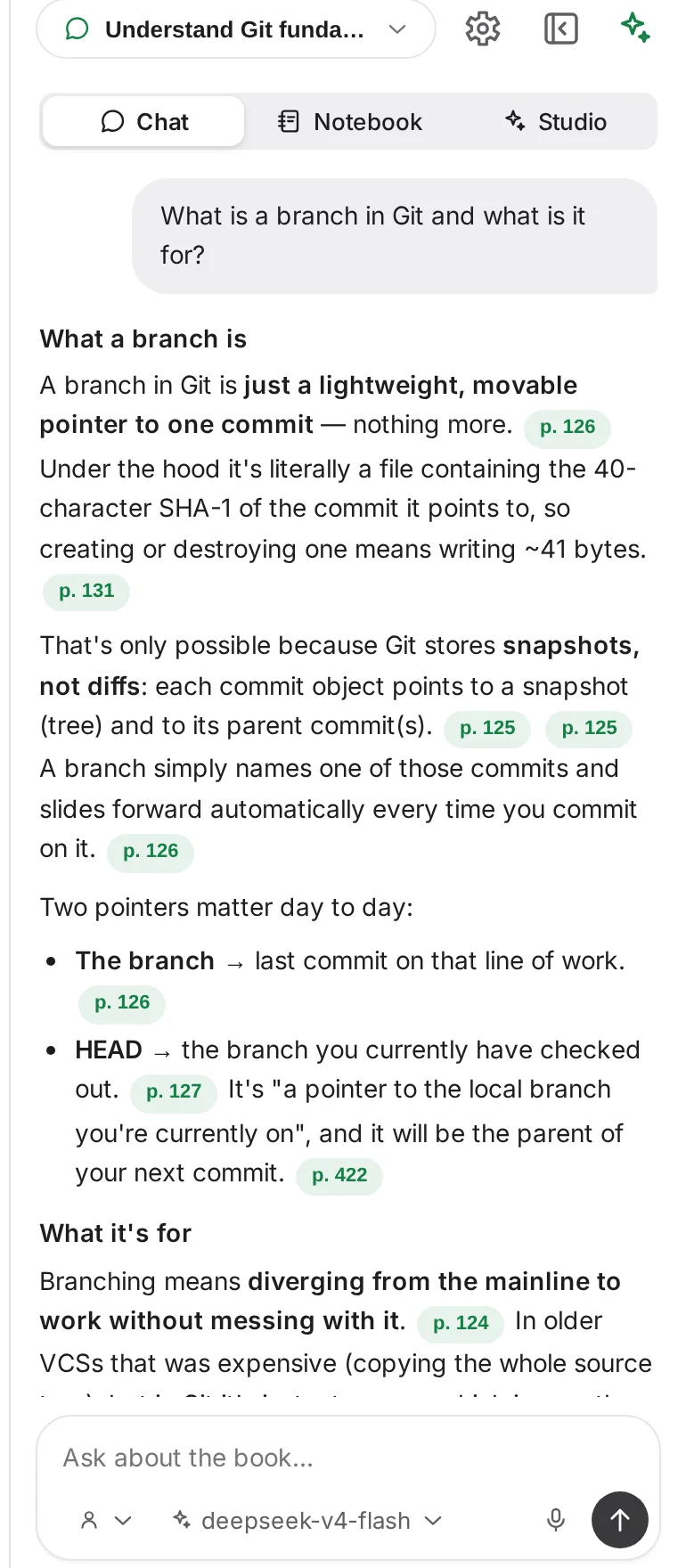
The agent answers with the book in front of it: it finds the passage that matters, shows it to you and writes the answer citing it. It does not search the web and does not make up sources; if something is not in the book, it says so.
The quick way: select and choose
Select some text and the action bar appears. The top ones are the usual questions:
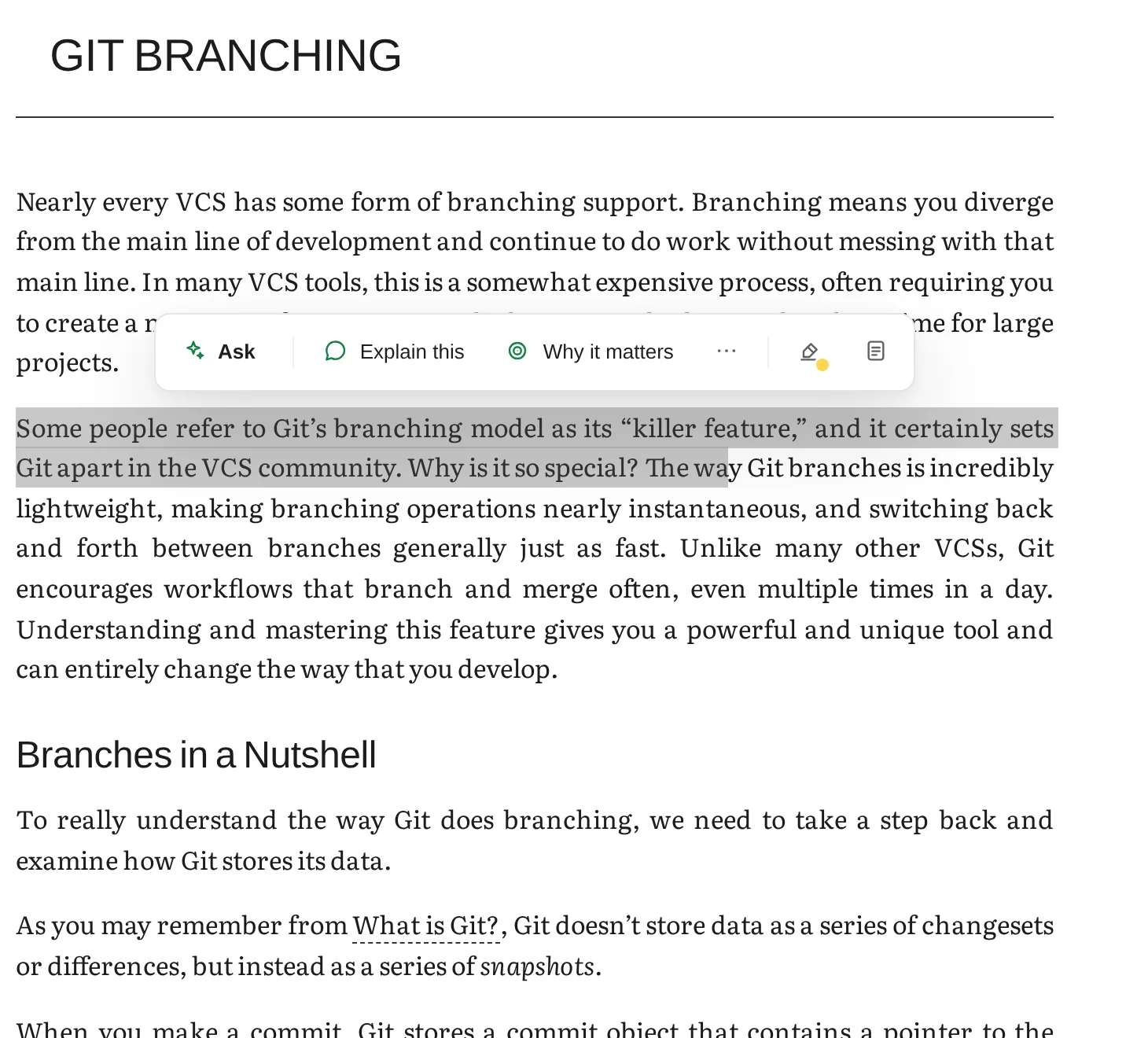
| Action | What it does |
|---|---|
| Explain this | Tells you in plain words, with a concrete example. |
| Why it matters | Connects it to your reading goal. |
| What it means here | The author's definition, not the dictionary's. |
| Where else | Looks for the same subject in another chapter. |
| Strongest objection | Argues against it: useful for reading with judgement. |
| With numbers | Turns the example into something measurable, when the book has data. |
From the same bar you can highlight in one tap (with the last colour), add a note, copy, share a quote card, send the passage to the notebook or start writing your own question with the passage attached.
Two of them need a goal
Why it matters and With numbers need a reading goal. If you have not picked one, the app asks for it: it is what makes the answer yours instead of a generic summary.
Asking by hand
Open the agent with ✦ (or ]) and type. You can:
- Ask about the chapter you are reading or about the whole book.
- Pick a reading goal and a notebook template for that conversation.
- Ask it to answer in your language even when the book is in another: it searches the original and replies in yours, quoting the original passage.
- Attach a figure or equation (PDF): select an area and send it with the question.
Citations: you can check the answer
Under each answer there are citations with their chapter and page. Tap one and the reader jumps to the passage. That is the difference between "the agent says" and "the book says": if the citation does not support the answer, the place to check it is right there.
Feynman mode: you explain it
Instead of asking, you explain. Open it from the book's Studio (the Explain it yourself card); it has three steps:
- Pick the concept. Not a chapter — an idea you can explain: "byte pair encoding", yes; "Working with Text Data", no. It suggests the leaves of the book's mind map and the subsections of what you are reading; if none fits, Suggest concepts asks the model for more.
- Explain in your own words. Before you type, the agent has already worked out which ideas a good explanation should hit and which mistakes are typical, each with its passage: the bar is set beforehand, not after the fact. The bar counts the ideas you have covered.
- It asks, it doesn't correct. When something is missing it escalates: first it asks for more, then a hint, then the specific piece, and only confirms once you have said it. It does not hand you the answer: you build it.
When you're done, "Enough — what did I miss?" gives you the diagnosis —what you covered and what you didn't, with its citation— drawn from the session itself, with no extra model call. Citations are chips: one tap and you are at the passage.
You can dictate instead of typing, with an ES/EN selector next to the microphone.
Speak instead of typing
Next to the text box there is a microphone (in Feynman mode too): record, release, and the text lands in the box. There are two engines:
- With a transcription model (Settings → Agent → “Transcription model”, uses your API key): the recording is transcribed when you release, and it is far better with technical vocabulary and proper names; it doesn't cut on a brief pause. The recording bar shows a level meter, so you know it hears you.
- Without one: the browser's recognizer is used. Live text, but it cuts on every pause and struggles more with jargon.
Transcription is biased with the book title and the open chapter: that is exactly where the proper nouns that would otherwise be guessed by ear live.
The question at the end of a chapter
With the HQ&A template active, when you start a new chapter the agent asks one recall question about the previous one. It does not give the answer: it is a check that what you read stuck. It only asks forwards and once per chapter.
If the answer does not help
- "I cannot find that in this book": the term does not appear as typed. Try the author's words, or ask Where else.
- It cites a passage and the answer wanders: make the question smaller. The agent does better with "what does it say here about X" than with "summarise the chapter".
- No agent at all: see Set up the agent.
Next step
- Turn reading into review.
- How the agent answers, with its limits.